Introduction
ResourceMachine is an HTTP decision machine for building API gateways and microservices in Node.js.
It is a port of Webmachine, the Erlang library that made HTTP correctness a first-class concern. The idea: instead of writing request handlers that manually branch on method, headers, and state, you describe your resource as a set of simple boolean and map methods, and a decision machine walks the HTTP diagram for you.
The problem it solves
Most HTTP frameworks give you a blank canvas. You write a handler, you check the method, you set a status code, and you ship it. That works fine — until you need to handle conditional requests, serve multiple content types from one endpoint, or implement correct cache validation. At that point you’re implementing a non-trivial chunk of RFC 7230–7235 by hand, and the edge cases accumulate quietly.
ResourceMachine handles the protocol layer. You handle the business logic.
The model
Each route maps to a Resource class. The decision machine constructs a new instance per request and walks ~40 decision points, calling your methods when it needs answers:
- Is the service available?
- Is this method allowed?
- Is the request authorized? Forbidden?
- Does the resource exist?
- Has it been modified since the client last fetched it?
- Which content types can you provide?
- Which content types can you accept on
PUT/PATCH?
Override only what’s relevant. Everything else defaults to safe, correct HTTP behavior.
import { createServer, Resource } from "resource-machine";

class PingResource extends Resource {
	override async contentTypesProvided() {
		return {
			"application/json": () => JSON.stringify({ ok: true }),
		};
	}
}

const server = createServer({ name: "my-api" });
server.addRoute("/ping", PingResource);
await server.listen(3000);
A GET /ping with Accept: application/json returns 200 with the JSON body. A request with Accept: text/html returns 406. A DELETE /ping returns 405. None of that required a single if statement.
Per-request instantiation
The router holds your class. The machine calls new YourResource(req, res) for each request. This means:
this.reqandthis.resare available in every method — no threading parameters through callbacks.thisis a natural place to cache DB lookups across decision calls. Fetch inresourceExists(), reuse incontentTypesProvided()— one round trip per request, not one per method call.- Per-request instances mean zero shared mutable state between concurrent requests.
Shared resources (database pools, config, caches) belong on class statics or module scope, not on this.
export function createUserResource(db: Database): ResourceClass {
	return class UserResource extends Resource {
		private user: User | null = null;

		override async resourceExists() {
			this.user = await db.users.find(this.req.params.id);
			return this.user !== null;
		}

		override async isAuthorized() {
			if (this.req.authorization?.token) return true;
			return 'Bearer realm="api"';
		}

		override async contentTypesProvided() {
			return {
				"application/json": () => JSON.stringify(this.user),
			};
		}
	};
}
What you get for free
By filling in your resource methods, you automatically get correct behavior for:
| Concern | How |
|---|---|
| Method enforcement | allowedMethods() → 405 Method Not Allowed |
| Content negotiation | contentTypesProvided() + Accept → 406 or matched type |
| Authorization | isAuthorized() returning string → 401 + WWW-Authenticate |
| Conditional GET | generateETag() + If-None-Match → 304 Not Modified |
| Preconditions | If-Match / If-Unmodified-Since → 412 Precondition Failed |
| Missing resources | resourceExists() → 404 Not Found |
| Body validation | contentTypesAccepted() → 415 Unsupported Media Type |
| Payload limits | maxBodySize option → 413 Payload Too Large |
HEAD requests | Handled automatically — no extra code |
OPTIONS | Returns Allow header, no extra code |
Vary header | Computed automatically from negotiation results |
What it is not
ResourceMachine is not a general-purpose web framework. It has no template engine, no session middleware, no static file serving built in (though you can implement a static resource yourself). It is optimized for one thing: making it easy to write HTTP APIs that behave correctly.
Next steps
- Server setup and route registration
- Resource handlers reference
- Error handling
- Debugging and tracing
- HTTP decision diagram
Server
Create a server with createServer() and register routes before calling listen().
import { createServer } from "resource-machine";
import { ArticleResource } from "./resources/article.js";

const server = createServer({ name: "my-api" });

server.addRoute("/articles/:id", ArticleResource);

await server.listen(3000);
console.log(`Listening on port ${server.port}`);

// Graceful shutdown
process.on("SIGTERM", async () => {
  await server.close();
});
Options
createServer(options?) accepts the following options:
| Option | Type | Default | Description |
|---|---|---|---|
name | string | "resource-machine" | Logger name (appears in pino log output) |
maxBodySize | number | 1048576 (1 MB) | Maximum request body size in bytes. Requests exceeding this limit receive 413 Payload Too Large. |
logger | pino.Logger | auto-created | Bring your own pino logger instance. |
API
server.addRoute(path, ResourceClass)
Register a Resource class at a path pattern. See Dispatching for path syntax.
server.listen(port?, host?)
Start the HTTP server. Returns a Promise<void> that resolves once the server is bound.
server.close()
Gracefully stop the server. Drains existing connections and resolves once fully closed.
server.port
The bound port number after listen() resolves. undefined before.
server.httpServer
The underlying http.Server instance — useful for supertest integration tests.
import request from "supertest";

const server = createServer();
server.addRoute("/ping", PingResource);
await server.listen(); // random port

const res = await request(server.httpServer).get("/ping");
Dispatching
Routes are added with server.addRoute(path, ResourceClass).
The router uses find-my-way (the same trie router as Fastify), giving O(1) route matching regardless of the number of routes.
Path Syntax
Static paths
"/articles"       matches only "/articles"
"/articles/new"   matches only "/articles/new"
Named parameters
"/articles/:id"           matches "/articles/42",  params: { id: "42" }
"/users/:user/posts/:id"  matches "/users/jon/posts/5", params: { user: "jon", id: "5" }
Parameters are available at this.req.params.id inside resource methods.
Wildcard
"/assets/*" matches "/assets/img/logo.png", params: { "*": "img/logo.png" }
Regex constraints on parameters
"/lang/:lang([a-z]{2})" matches "/lang/en" but not "/lang/english"
Resource Class
The second argument to addRoute must be a class that extends Resource. The decision machine constructs a new instance per request:
import { createServer, Resource } from "resource-machine";

class PingResource extends Resource {
  override async contentTypesProvided() {
    return { "text/plain": () => "pong" };
  }
}

const server = createServer();
server.addRoute("/ping", PingResource);
Injecting shared state via factory
When a resource needs access to a shared object (e.g. a database connection pool), use a factory function that closes over the shared value and returns a ResourceClass:
import type { ResourceClass } from "resource-machine";
import { Resource } from "resource-machine";
import type { Database } from "./db.js";

export function createArticleResource(db: Database): ResourceClass {
  return class ArticleResource extends Resource {
    private article: Article | null = null;

    override async resourceExists() {
      this.article = await db.find(this.req.params.id ?? "");
      return this.article !== null;
    }

    override async contentTypesProvided() {
      return {
        "application/json": () => JSON.stringify(this.article),
      };
    }
  };
}

// Registration
server.addRoute("/articles/:id", createArticleResource(db));
Shared resources (DB pools, config) belong on class statics or module scope — not on this. this is per-request.
Resource Handlers
Resources are TypeScript classes that extend the Resource base class. Override only the methods you need — every method has a safe HTTP default.
import { Resource } from "resource-machine";

class ArticleResource extends Resource {
  private article: Article | null = null;

  override async allowedMethods() {
    return ["GET", "HEAD", "PUT", "DELETE"];
  }

  override async resourceExists() {
    // Cache the DB lookup on `this` — reused by contentTypesProvided
    this.article = await db.find(this.req.params.id ?? "");
    return this.article !== null;
  }

  override async contentTypesProvided() {
    return {
      "application/json": () => JSON.stringify(this.article),
    };
  }
}
Per-Request Instantiation
The router holds the class. The decision machine calls new ArticleResource(req, res) for each incoming request. This means:
this.reqandthis.resare available in every method.thisis a natural cache for data fetched during one decision (likeresourceExists) and reused in a later one (likecontentTypesProvided).- There is no shared mutable state between concurrent requests.
Available in All Methods
| Property | Type | Description |
|---|---|---|
this.req | RMRequest | Augmented incoming request |
this.res | RMResponse | Augmented server response |
this.req.params | Record<string, string | undefined> | Route parameters |
this.req.query | Record<string, string | string[]> | Query string parameters |
this.req.log | pino.Logger | Per-request pino logger (attached by pino-http) |
Defaults
If you do not override a method, it falls back to a default that produces correct HTTP behavior for a read-only resource:
| Method | Default |
|---|---|
serviceAvailable | true |
allowedMethods | ["GET", "HEAD"] |
resourceExists | true |
isAuthorized | true |
isForbidden | false |
contentTypesProvided | { "application/json": toJSON } |
See Resource Functions for the full list.
Resource Functions
All methods are async and called by the decision machine at the appropriate point in the HTTP diagram. Override only what you need.
serviceAvailable()
Returns:
Promise<boolean>— Default:true
Return false to send 503 Service Unavailable. Useful for maintenance mode or circuit-breaker patterns.
knownMethods()
Returns:
Promise<string[]>— Default: all common HTTP methods
Return false (via false not in the list) for a method to send 501 Not Implemented. Distinct from allowedMethods — this is for methods the server has never heard of.
uriTooLong()
Returns:
Promise<boolean>— Default:false
Return true to send 414 URI Too Long.
allowedMethods()
Returns:
Promise<string[]>— Default:["GET", "HEAD"]
Methods not in this list receive 405 Method Not Allowed. The response automatically includes an Allow header listing the permitted methods.
override async allowedMethods() {
  return ["GET", "HEAD", "PUT", "DELETE"];
}
malformedRequest()
Returns:
Promise<boolean>— Default:false
Return true to send 400 Bad Request. Called before authorization, so it’s appropriate for structural checks (missing required headers, invalid content-type for the method).
isAuthorized()
Returns:
Promise<boolean | string>— Default:true
Return true to allow the request. Return false or a string to send 401 Unauthorized. When a string is returned it is used as the WWW-Authenticate header value.
override async isAuthorized() {
  const auth = this.req.authorization;
  if (!auth || auth.type !== "Basic") {
    return 'Basic realm="My App"';
  }
  const valid = await checkCredentials(auth.username, auth.password);
  return valid ? true : 'Basic realm="My App"';
}
isForbidden()
Returns:
Promise<boolean>— Default:false
Return true to send 403 Forbidden. Called after isAuthorized — use this for authorization (can the authenticated user access this resource?).
validContentHeaders()
Returns:
Promise<boolean>— Default:true
Return false to send 415 Unsupported Media Type. Validates Content-* headers on requests with a body.
knownContentType()
Returns:
Promise<boolean>— Default:true
Return false to send 415 Unsupported Media Type. Called when the request has a body.
validEntityLength()
Returns:
Promise<boolean>— Default:true
Return false to send 413 Payload Too Large. Note: the server already enforces maxBodySize at the connection level before this is called.
options()
Returns:
Promise<Record<string, string>>— Default:{}
Return headers to include in an OPTIONS response. The Allow header is added automatically.
contentTypesProvided()
Returns:
Promise<Record<string, BodyProvider>>
Maps Content-Type values to body-producer functions. Content negotiation is driven by this. A client Accept header that doesn’t match any key here receives 406 Not Acceptable.
override async contentTypesProvided() {
  return {
    "application/json": () => JSON.stringify(this.data),
    "text/html": () => renderHTML(this.data),
    "text/plain": () => this.data.name,
  };
}
Producer functions can return string | Buffer | Readable | Promise<...>. Streaming is supported by returning a Readable.
contentTypesAccepted()
Returns:
Promise<Record<string, () => boolean | Promise<boolean>>>— Default:{}
Maps Content-Type values to handler functions for incoming request bodies (PUT, POST). Use this.req.getBody() to read the body.
override async contentTypesAccepted() {
  return {
    "application/json": async () => {
      const raw = await this.req.getBody();
      const body = JSON.parse(raw.toString());
      await db.save(this.req.params.id, body);
      return true;
    },
  };
}
resourceExists()
Returns:
Promise<boolean>— Default:true
Return false to send 404 Not Found (or trigger the previouslyExisted / allowMissingPost branches). Cache the fetched resource on this for reuse in other methods.
generateEtag()
Returns:
Promise<string | undefined>— Default:undefined
Return a string to set the ETag header and enable conditional request handling (If-Match, If-None-Match).
lastModified()
Returns:
Promise<Date | undefined>— Default:undefined
Return a Date to set the Last-Modified header and enable If-Modified-Since / If-Unmodified-Since checks.
expires()
Returns:
Promise<Date | undefined>— Default:undefined
Return a Date to set the Expires header.
multipleChoices()
Returns:
Promise<boolean>— Default:false
Return true to send 300 Multiple Choices.
previouslyExisted()
Returns:
Promise<boolean>— Default:false
Return true when a resource once existed but no longer does. Enables the movedPermanently / movedTemporarily checks before falling back to 410 Gone.
movedPermanently()
Returns:
Promise<string | false>— Default:false
Return a URL string to send 301 Moved Permanently with that Location. Return false to continue.
movedTemporarily()
Returns:
Promise<string | false>— Default:false
Return a URL string to send 307 Temporary Redirect with that Location. Return false to continue.
allowMissingPost()
Returns:
Promise<boolean>— Default:false
Return true to allow POST requests to resources that don’t exist (resourceExists returned false).
postIsCreate()
Returns:
Promise<boolean>— Default:false
Return true to treat POST as a create-and-redirect operation. When true, createPath() is called and the request continues as a PUT to that path.
createPath()
Returns:
Promise<string | undefined>— Default:undefined
Required when postIsCreate() returns true. Return the URI path for the newly created resource.
processPost()
Returns:
Promise<boolean | string>— Default:false
Called when postIsCreate() returns false. Perform the POST action. Return true on success, or a URL string to redirect.
isConflict()
Returns:
Promise<boolean>— Default:false
Return true to send 409 Conflict on PUT requests.
deleteResource()
Returns:
Promise<boolean>— Default:false
Perform the DELETE. Return true if deletion was initiated.
deleteCompleted()
Returns:
Promise<boolean>— Default:true
Called after a successful deleteResource. Return false if deletion is async and not yet confirmed (sends 202 Accepted instead of 204 No Content).
languageAvailable()
Returns:
Promise<boolean>— Default:true
Return false to send 406 Not Acceptable when no acceptable language is available.
charsetsProvided()
Returns:
Promise<Record<string, () => Transform> | undefined>— Default:undefined
Return a map of charset name to transform stream factory. When undefined, no charset negotiation is performed.
encodingsProvided()
Returns:
Promise<Record<string, () => Transform>>— Default:{ identity: ... }
Return a map of encoding name to transform stream factory. The identity encoding (no-op) is always available.
variances()
Returns:
Promise<string[]>— Default:[]
Additional header names to include in the Vary response header. The standard negotiation headers (Accept, Accept-Language, Accept-Charset, Accept-Encoding) are added automatically.
validateContentChecksum()
Returns:
Promise<boolean | undefined>— Default:undefined
When the request includes a Content-MD5 header: return true to accept, false to reject with 400 Bad Request, or undefined to let ResourceMachine validate it automatically.
finishRequest()
Returns:
Promise<void>
Called at the end of every request (success or error). Use for cleanup, metrics, or finalization logic.
Request
RMRequest extends Node’s http.IncomingMessage with the following additions.
Properties
req.params
Route parameters matched from the path pattern.
// Route: "/articles/:id"
// URL:   "/articles/42"
this.req.params.id; // "42"
req.query
Parsed query string as a plain object. Multi-value keys become arrays.
// URL: "/search?q=foo&tag=a&tag=b"
this.req.query.q; // "foo"
this.req.query.tag; // ["a", "b"]
req.pathname
The path portion of the URL, without the query string.
// URL: "/articles/42?format=json"
this.req.pathname; // "/articles/42"
req.search
The raw query string including the leading ?.
this.req.search; // "?format=json"
req.choices
Negotiated content choices, set by the decision tree.
req.choices.contentType; // e.g. "application/json"
req.choices.language; // e.g. "en"
req.choices.encoding; // e.g. "identity"
req.choices.charset; // e.g. "utf-8"
req.abortSignal
An AbortSignal that fires when the client disconnects. Pass this to database queries or fetch() calls to cancel in-flight work.
const data = await db.find(id, { signal: this.req.abortSignal });
req.log
A pino logger scoped to this request (attached by pino-http). Includes requestId in every log line.
this.req.log.info({ userId }, "Fetching user");
this.req.log.error({ err }, "Database query failed");
Methods
req.getBody()
Returns Promise<Buffer>. Resolves once the full request body has been buffered. Body buffering starts immediately on connection — calling getBody() from any resource method is safe.
const raw = await this.req.getBody();
const body = JSON.parse(raw.toString()) as MyType;
Bodies exceeding maxBodySize (default 1 MB) are rejected with 413 Payload Too Large before buffering begins.
req.baseURI(path)
Constructs an absolute URI from a path using the incoming Host header.
this.req.baseURI("/articles/42"); // "http://example.com/articles/42"
req.enableTrace(directory)
Writes a JSON trace file for this request into directory. Each file records the sequence of decision tree nodes visited. Enabling this has a significant performance cost — use only during development.
this.req.enableTrace("/tmp/rm-traces");
Response
RMResponse extends Node’s http.ServerResponse with the following additions.
Properties
res.redirect
Set to true inside processPost or createPath to make the response a 303 See Other redirect instead of the normal 2xx. The Location header must be set separately.
override async processPost() {
  const id = await createResource(this.req);
  this.res.setHeader("Location", this.req.baseURI(`/articles/${id}`));
  this.res.redirect = true;
  return true;
}
Methods
res.setBody(body)
Sets the response body. Accepted types:
| Type | Description |
|---|---|
string | Encoded to bytes using the negotiated charset (default UTF-8) |
Buffer | Sent as-is |
Readable | Piped to the response — enables streaming |
// String
this.res.setBody("Hello, world!");

// JSON
this.res.setBody(JSON.stringify({ ok: true }));

// Stream
this.res.setBody(createReadStream("/path/to/file.txt"));
setBody is typically called inside a contentTypesProvided handler, though it can also be called directly inside processPost when the response body should be set as part of POST handling.
Body Providers
The more idiomatic approach is to return a body producer from contentTypesProvided. The return value of the producer is passed through encoding and charset transforms before being sent:
override async contentTypesProvided() {
  return {
    "application/json": () => JSON.stringify(this.data),
    "text/plain": () => `Name: ${this.data.name}`,
    "application/octet-stream": () => createReadStream(this.filePath),
  };
}
The producer can be sync or async — both are awaited before sending.
Resource Tips
Cache DB lookups across decisions
resourceExists is called early in the decision tree, well before contentTypesProvided. Store the result on this to avoid a second query:
class ArticleResource extends Resource {
  private article: Article | null = null;

  override async resourceExists() {
    this.article = await db.articles.find(this.req.params.id ?? "");
    return this.article !== null;
  }

  override async contentTypesProvided() {
    // article already fetched — no second DB call
    return {
      "application/json": () => JSON.stringify(this.article),
    };
  }
}
Inject shared state via factory functions
When a resource needs a DB pool, config, or other shared object, close over it:
export function createArticleResource(db: Database): ResourceClass {
  return class ArticleResource extends Resource {
    // db is available here via closure
    override async resourceExists() {
      return (await db.find(this.req.params.id ?? "")) !== null;
    }
  };
}

server.addRoute("/articles/:id", createArticleResource(db));
Throw HTTP errors from any method
Any resource method can throw an HttpError subclass. The decision machine catches it and sends the appropriate status code:
import { BadRequestError, ForbiddenError } from "resource-machine";

override async processPost() {
  const body = await this.req.getBody();
  let data: unknown;
  try {
    data = JSON.parse(body.toString());
  } catch {
    throw new BadRequestError("Invalid JSON");
  }
  // ...
  return true;
}
Use req.log for structured logging
this.req.log is a pino logger scoped to the request. Every line automatically includes requestId:
override async resourceExists() {
  const item = await db.find(this.req.params.id ?? "");
  if (!item) {
    this.req.log.info({ id: this.req.params.id }, "Item not found");
    return false;
  }
  this.item = item;
  return true;
}
Handle cancellation with AbortSignal
this.req.abortSignal fires when the client disconnects. Pass it to async operations:
const result = await db.slowQuery(id, { signal: this.req.abortSignal });
This prevents wasted work when the client navigates away or times out.
Trace the decision tree during development
Call this.req.enableTrace("/tmp/rm-traces") (e.g. in your constructor) to write a JSON file for each request showing which nodes in the decision diagram were visited:
constructor(req: RMRequest, res: RMResponse) {
  super(req, res);
  if (process.env.NODE_ENV !== "production") {
    this.req.enableTrace("/tmp/rm-traces");
  }
}
Error Handling
Throwing HTTP Errors
Any resource method can throw an HttpError subclass. The decision machine catches it and writes the appropriate HTTP response:
import { BadRequestError, NotFoundError } from "resource-machine";

override async processPost() {
  const raw = await this.req.getBody();
  let body: unknown;
  try {
    body = JSON.parse(raw.toString());
  } catch {
    throw new BadRequestError("Invalid JSON");
  }

  if (!isValid(body)) {
    throw new BadRequestError("Schema validation failed");
  }

  await db.save(body);
  return true;
}
The response body is a JSON object:
{
	"code": "BadRequest",
	"message": "Invalid JSON"
}
Logging
ResourceMachine uses pino for logging. Every request gets a scoped logger at this.req.log (attached by pino-http). Unhandled errors are logged at error level with full stack traces.
Customize the logger by passing your own pino instance to createServer:
import pino from "pino";
import { createServer } from "resource-machine";

const logger = pino({
	level: "debug",
	transport: {
		target: "pino-pretty",
		options: { colorize: true },
	},
});

const server = createServer({ logger });
Unhandled Errors
If a resource method throws something that is not an HttpError, ResourceMachine logs it and responds with 500 Internal Server Error.
Error List
All error classes are exported from resource-machine and extend HttpError.
import { BadRequestError, NotFoundError } from "resource-machine";
Every error has:
statusCode: number— the HTTP status codebody: { code: string; message: string }— the JSON response bodymessage: string— the error message (same asbody.message)
HTTP Error Classes
| Status | Class |
|---|---|
| 400 | BadRequestError |
| 401 | UnauthorizedError |
| 403 | ForbiddenError |
| 404 | NotFoundError |
| 405 | MethodNotAllowedError |
| 406 | NotAcceptableError |
| 409 | ConflictError |
| 410 | GoneError |
| 412 | PreconditionFailedError |
| 413 | PayloadTooLargeError |
| 414 | UriTooLongError |
| 415 | UnsupportedMediaTypeError |
| 500 | InternalServerError |
| 501 | NotImplementedError |
| 503 | ServiceUnavailableError |
Base Class
import { HttpError } from "resource-machine";

// All of the above extend HttpError
class HttpError extends Error {
	readonly statusCode: number;
	readonly body: { code: string; message: string };
}
Custom Errors
Create custom HTTP error classes by extending HttpError:
import { HttpError } from "resource-machine";

export class UnprocessableEntityError extends HttpError {
	constructor(message = "Unprocessable Entity") {
		super(422, message);
	}
}

export class TooManyRequestsError extends HttpError {
	constructor(message = "Rate limit exceeded") {
		super(429, message);
	}
}
Throw them from any resource method:
import { UnprocessableEntityError } from "./errors.js";

override async processPost() {
  const body = await this.req.getBody();
  const data = JSON.parse(body.toString());
  if (!schema.validate(data)) {
    throw new UnprocessableEntityError("Document failed schema validation");
  }
  await db.save(data);
  return true;
}
The response will be:
HTTP/1.1 422 Unprocessable Entity
Content-Type: application/json

{"code":"UnprocessableEntity","message":"Document failed schema validation"}
Passing a Cause
Use the standard cause option to chain errors for better debugging:
try {
	await db.save(data);
} catch (err) {
	throw new InternalServerError("Database write failed", { cause: err });
}
The cause is logged by pino but not sent to the client.
Debugging
ResourceMachine provides two debugging tools:
- Request Tracing — writes a JSON trace file per request showing the decision tree path taken
- Visual Tracer — view trace files as a rendered decision diagram
Structured Logging
All server activity is logged via pino. During development, use pino-pretty for human-readable output:
node server.js | npx pino-pretty -S
Each request log line includes requestId, method, URL, status, and response time.
Use this.req.log inside resource methods for structured per-request logging — every line automatically carries the requestId.
Request Tracing
ResourceMachine can write a JSON trace file for each request, recording every decision tree node that was visited and the outcome at each step.
Enabling
Call this.req.enableTrace(directory) from the resource constructor or any resource method. The trace file is written when the request completes.
import { Resource } from "resource-machine";
import type { RMRequest, RMResponse } from "resource-machine";

class ArticleResource extends Resource {
  constructor(req: RMRequest, res: RMResponse) {
    super(req, res);
    // Enable tracing in development only
    if (process.env.RM_TRACE_DIR) {
      this.req.enableTrace(process.env.RM_TRACE_DIR);
    }
  }

  // ...
}
RM_TRACE_DIR=/tmp/rm-traces node server.js
Trace File Format
Each trace file is written as <traceDirectory>/<requestId>-<timestamp>.json:
{
  "requestId": 42,
  "method": "GET",
  "url": "/articles/5",
  "status": 200,
  "decisions": [
    "v3b13",
    "v3b12",
    "v3b11",
    "v3b10",
    "v3b9",
    "v3b8",
    "v3b7",
    "v3c3",
    "v3d4",
    "v3e5",
    "v3f6",
    "v3g7",
    "v3g8",
    "v3h10",
    "v3i12",
    "v3l13",
    "v3m16",
    "v3n16",
    "v3o16",
    "v3o18"
  ]
}
Decision names correspond to nodes in the Webmachine v3 HTTP diagram.
Warning: Tracing has a measurable performance cost. Do not enable it in production.
Visual Tracer
The visual tracer renders request trace files as an annotated decision diagram, making it easy to see exactly which path through the HTTP state machine a given request took.
Viewing a Trace
Trace files are written by req.enableTrace(directory) — see Request Tracing for setup.
Once you have a trace file, you can map the decision sequence back to the HTTP diagram manually, or use a diagram tool with the node names as reference:
- Open the HTTP decision diagram.
- Locate the first decision in
decisions[](alwaysv3b13). - Follow each step in order — the diagram branches are labeled with the return value that leads to each path.
Interpreting Decision Names
Decision names follow the pattern v3<column><row>:
| Name | Description |
|---|---|
v3b13 | Service available? |
v3b12 | Known method? |
v3b11 | URI too long? |
v3b10 | Method allowed? |
v3c3 | Accept header present? |
v3d4 | Acceptable media type available? |
v3g7 | Resource exists? |
v3l13 | If-Modified-Since present? |
v3o18 | Conflict? |
See the full HTTP diagram for the complete node map.
Mechanics
ResourceMachine implements the Webmachine v3 HTTP decision diagram. Understanding this diagram explains why ResourceMachine handles HTTP correctly where hand-rolled frameworks often don’t.
The Decision Loop
When a request arrives, the server:
- Constructs a new instance of your
Resourceclass:new YourResource(req, res). - Starts the decision loop at node
v3b13(service available?). - At each node, calls the corresponding resource method and branches based on the return value.
- Continues until reaching a terminal node, which sets the response status and ends the request.
The loop is a simple while:
current = v3b13
while current is a function:
    current = await current(req, res, resource)
Each decision function either returns the next function to call, or void (terminal — response already written).
Why This Matters
HTTP has many interacting concerns: authorization must happen before content negotiation, conditional request checks must happen in the right order relative to method handling, ETags must be checked before and after modification. The diagram encodes all of this correctly. Your resource just answers questions — the machine handles the sequencing.
Decision Functions
There are ~40 decision functions in src/decision_tree/v3/tree.ts, named v3b13 through v3p11. Each corresponds to a box in the HTTP diagram.
Per-Request Isolation
Each request gets its own Resource instance. There is no shared mutable state between concurrent requests — concurrent isolation is structural, not synchronized.
The HTTP Diagram
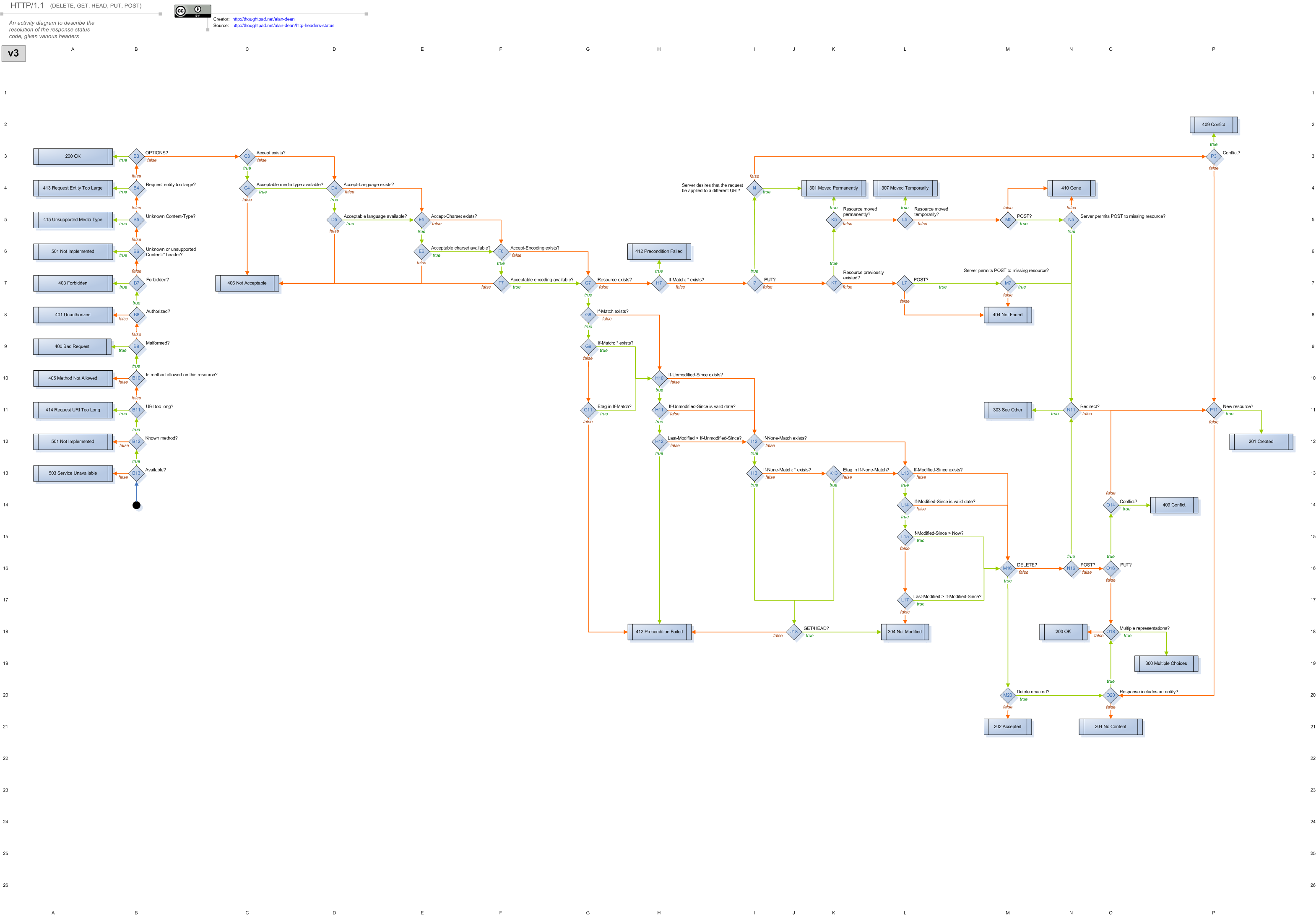
ResourceMachine implements the Webmachine v3 HTTP decision diagram. This diagram encodes the full state machine for correct HTTP response generation.
v3 Diagram
Reading the Diagram
Each box is a decision point. The label on each arrow is the return value from the corresponding resource method that leads down that branch. Follow the arrows from v3b13 (top) to any of the terminal status codes (leaves).
When you override a resource method, you are controlling which branch is taken at that node. All other nodes fall through to their defaults.
Changelog
0.5.0
- Complete rewrite in TypeScript targeting Node.js 22
- Replaced callback-based decision tree with
async/await - Replaced
suspend,bunyan,verror,extendwith modern equivalents - Added
pino+pino-httpfor structured logging - Added
find-my-waytrie router (O(1) matching) - Fixed O(n²) buffer allocation in request body handling
- Added
diagnostics_channelsupport for request tracing (replaces DTrace) - Added configurable
maxBodySizewith fast 413 rejection onContent-Length - Fixed
v3g7: Vary header was never populated in old code - Fixed
v3l17: null dereference on missinglastModified - Fixed
v3e6: malformedContent-Typecharset parameter (charset:→charset=) - Fixed
v3n11: POST redirect returned 201 instead of 303 - Fixed OPTIONS response to always include
Allowheader (RFC 7231 §4.3.7) - Fixed 304 responses to strip content headers (RFC 7232 §4.1)
- Migrated docs from GitBook to mdBook
- Dropped Node
>=4.0.0requirement; now requires>=22.0.0
Older versions…
Let’s not worry about them… I was young. And naive.